
Note
Go to the end to download the full example code or to run this example in your browser via Binder.
Querying PUNCH Data#
A notebook guide to querying and loading PUNCH data using SunPy.
This notebook provides a guide on how to query PUNCH data from the SDAC / VSO using Python tools, and how to load and display this data. Note that PUNCH provides some bespoke tools to assist Fido in querying the complex range of data products and versions of PUNCH.
Load libraries
from sunpy.net import Fido
from sunpy.net import attrs as a

import punchbowl  # Note that this import is needed to register PUNCH fido tools
from punchbowl.data import punch_io, visualize
With a range of dates and a PUNCH data product in mind, we can begin querying data. Here we’ll search for level 3 clear low-noise mosaics from 1-2 November 2025. We’re looking for CAM data, so a product code of “CA” and a instrument code of “M”. We can construct a query using the Fido tool, specifying search attributes:
result = Fido.search(a.Time('2025/10/30 12:00:00', '2025/10/31 12:00:00'),
                     a.punch.ProductCode.ca, # (ca for clear low-noise), or pa for polarized low-noise, etc.
                     a.Instrument.m, # (m for mosaic), or a.Instrument.nfi_4, etc for earlier levels.
                     a.Level.three,
                     a.punch.DataVersion.newest, # or a.punch.DataVersion.zero_j, etc.
                     a.punch.FileType.fits) # or a.punch.FileType.jp2

result
This results in a table of available data products that match the search criteria. Next, let’s download the first file from this list of results:
try:
    files = Fido.fetch(result[0][0])
except IndexError:
    print("Oops no files were found!")
    files = None
Files Downloaded:   0%|          | 0/1 [00:00<?, ?file/s]

PUNCH_L3_CAM_20251030120000_v0j.fits:   0%|          | 0.00/22.7M [00:00<?, ?B/s]

PUNCH_L3_CAM_20251030120000_v0j.fits:   0%|          | 1.02k/22.7M [00:00<53:27, 7.07kB/s]

PUNCH_L3_CAM_20251030120000_v0j.fits:   2%|▏         | 452k/22.7M [00:00<00:09, 2.24MB/s]

PUNCH_L3_CAM_20251030120000_v0j.fits:   8%|▊         | 1.81M/22.7M [00:00<00:03, 6.93MB/s]

PUNCH_L3_CAM_20251030120000_v0j.fits:  17%|█▋        | 3.78M/22.7M [00:00<00:01, 11.7MB/s]

PUNCH_L3_CAM_20251030120000_v0j.fits:  31%|███       | 7.08M/22.7M [00:00<00:00, 19.1MB/s]

PUNCH_L3_CAM_20251030120000_v0j.fits:  50%|████▉     | 11.3M/22.7M [00:00<00:00, 26.8MB/s]

PUNCH_L3_CAM_20251030120000_v0j.fits:  77%|███████▋  | 17.6M/22.7M [00:00<00:00, 38.3MB/s]


Files Downloaded: 100%|██████████| 1/1 [00:00<00:00,  1.02file/s]
Files Downloaded: 100%|██████████| 1/1 [00:00<00:00,  1.02file/s]
This returns a list of paths to files that have been downloaded. Note that the Fido.fetch tool can specify a particular download directory for larger data searches. With that file downloaded, we can plot the data:
if files:
    fig, ax = visualize.plot_punch(files[0])
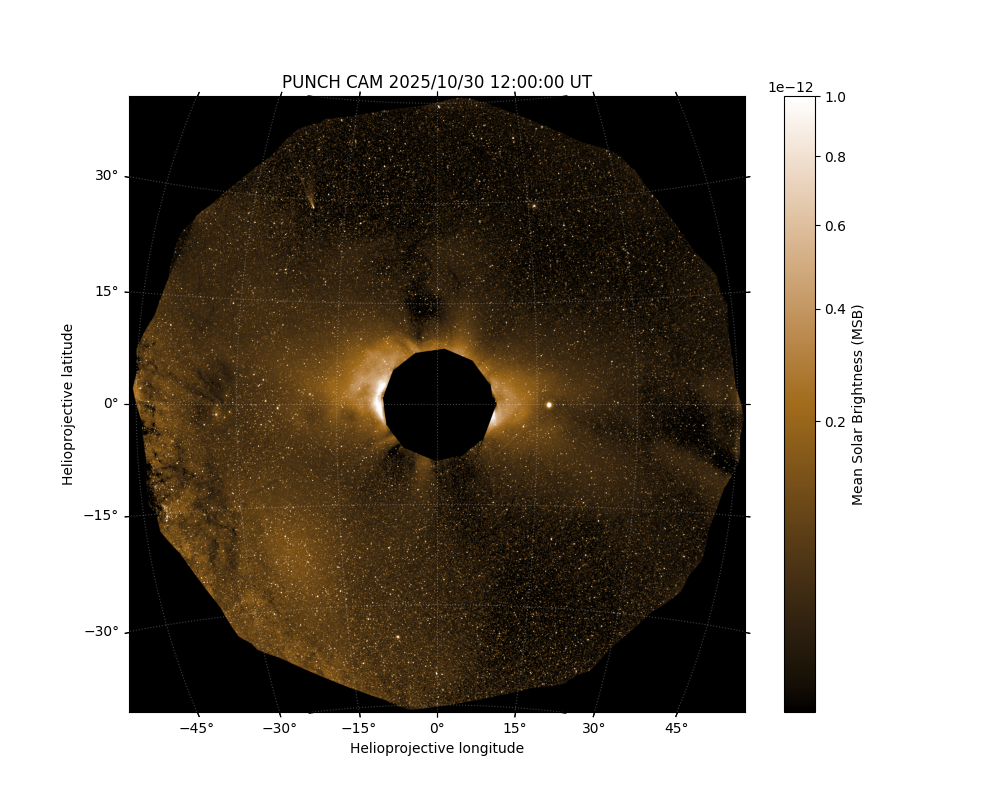
And that’s it! From here the data is loaded into the PUNCH plotting tool and displayed. Of course this is just one path, you could always load the data using the punchbowl.data.punch_io.load_ndcube_from_fits() function or Astropy fits tools. As an example you could load this file using:
if files:
    datacube = punch_io.load_ndcube_from_fits(files[0])

datacube
<ndcube.ndcube.NDCube object at 0x7120fdc83020>
NDCube
------
Shape: (4096, 4096)
Physical Types of Axes: [('custom:pos.helioprojective.lon', 'custom:pos.helioprojective.lat'), ('custom:pos.helioprojective.lon', 'custom:pos.helioprojective.lat')]
Unit: ct
Data Type: float64
Total running time of the script: (0 minutes 3.317 seconds)
